Community project · Not a Microsoft product · Architecture showcase
Custom Agent Reporting – Architecture
A reference design for tenant-wide reporting on agents across Copilot Studio, Microsoft 365 Copilot Agent Builder, SharePoint agents and Microsoft Foundry. It is built from read-only Microsoft APIs, a few Power Automate collectors and a Power BI report.
An architecture showcase, not a Power BI solution
This page showcases an architecture and what's possible with a custom build: the data lanes, the semantic model's design, the lessons learned and anonymised screenshots of a working report. No Power BI solution is provided. There's no report file (PBIX), semantic model or code to download, because the setup is complex and every tenant needs its own app registrations, permissions, collectors and customisation. Use the design as a guide to build your own.
One part of the semantic model, Copilot interaction usage, comes from Copilot Interaction Logging. Its build guide shows how to build that collector from scratch.
It isn't a product, and it is not a replacement for Microsoft Agent 365.
- 6 data lanes3 direct, 3 through daily collectors
- 3 connectorsResource Graph, Dataverse, Web
- No gatewayScheduled refresh in the service
- One Dataverse feedAll collectors in one environment
- 21 tablesA star schema around the agent
- 16 report pages287 visuals
- Read-onlyNever changes an agent
Read this first
Not a replacement for Microsoft Agent 365
This is a custom build, not a Microsoft product
Microsoft Agent 365 is Microsoft's control plane for agents: it helps organisations observe, govern and secure them. The design on this page only reports. It shows what a custom solution can do, and it doesn't do what Agent 365 does. If your organisation has Agent 365, use it.
- You build, run and maintain it. Nothing here is a service. You own the collectors, the credentials, the refresh schedule and every fix when an API changes. Agent 365 is delivered and maintained by Microsoft.
- Reporting only. It reads metadata and draws a report. It can't create, change, block, quarantine or delete an agent.
- No agent identity management. It reads identity linkage properties, but it doesn't issue, govern or review agent identities.
- No content inspection or data loss prevention. It never reads prompts or responses, and it can't apply protection policies.
- No per-agent cost metering.
- Coverage gaps. Some agents and properties aren't reachable through the public APIs it uses; see Platform coverage.
- No support. It is community documentation, shared as is. Microsoft doesn't support it.
How the scope compares
| Area | Microsoft Agent 365 | This design |
|---|---|---|
| Delivery | Microsoft service | Your own build – you run and maintain it |
| Observe | Registry, agent map, adoption, activity and health | A scheduled Power BI report |
| Govern | Lifecycle, access and compliance through the Microsoft 365 admin center, Microsoft Entra and Microsoft Purview | None – read-only |
| Secure | Entra risk-based access, Purview information protection and data loss prevention, and Microsoft Defender | A heuristic risk score, with no enforcement |
| Identity | Microsoft Entra Agent ID | Reads linkage properties only |
| Support | Microsoft | Community documentation, no support |
Agent 365 capabilities are summarised from public Microsoft documentation at the time of writing and may change. Check the service description for the current scope.
The gaps listed on this page describe this design and the public APIs it uses, not Agent 365. Some registry attributes, such as an agent's description, its publisher, the named users it's shared with and its sensitivity label, weren't reachable in this build. If you have Agent 365, its registry and APIs are the better inventory source.
Proof it works
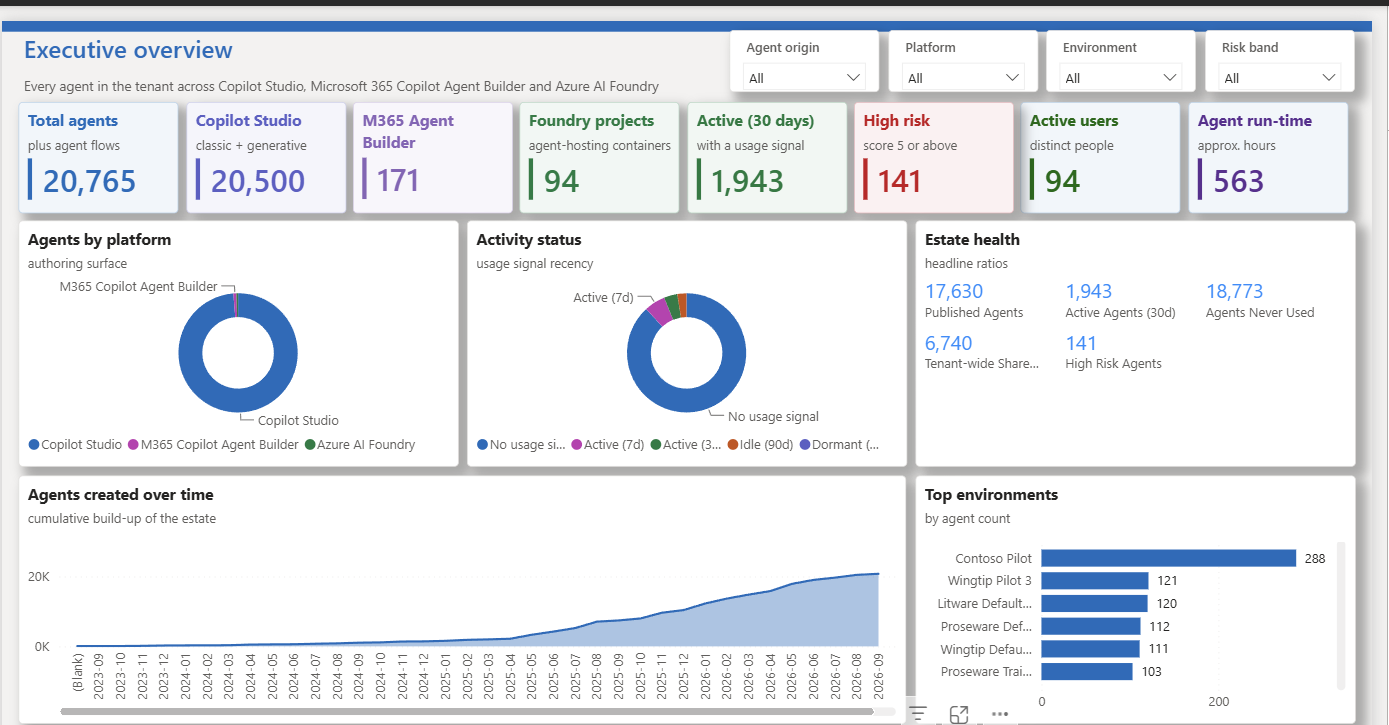
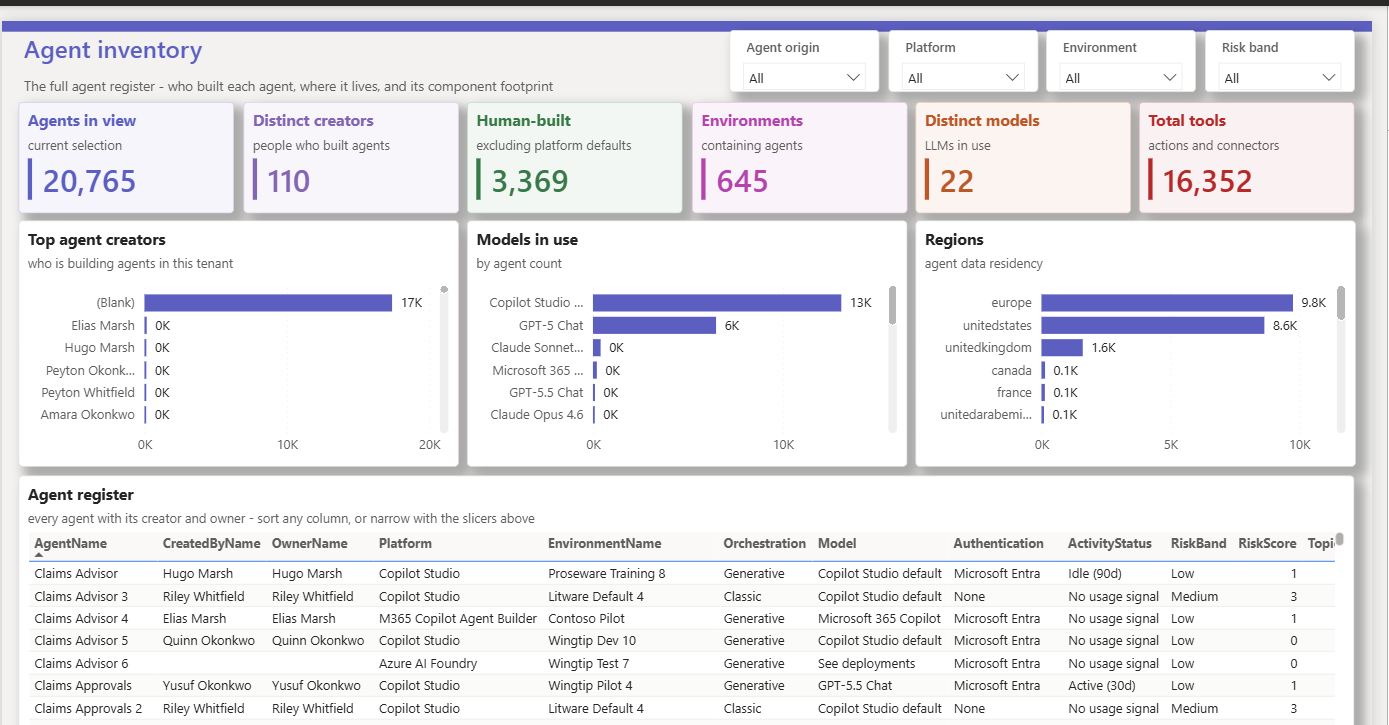
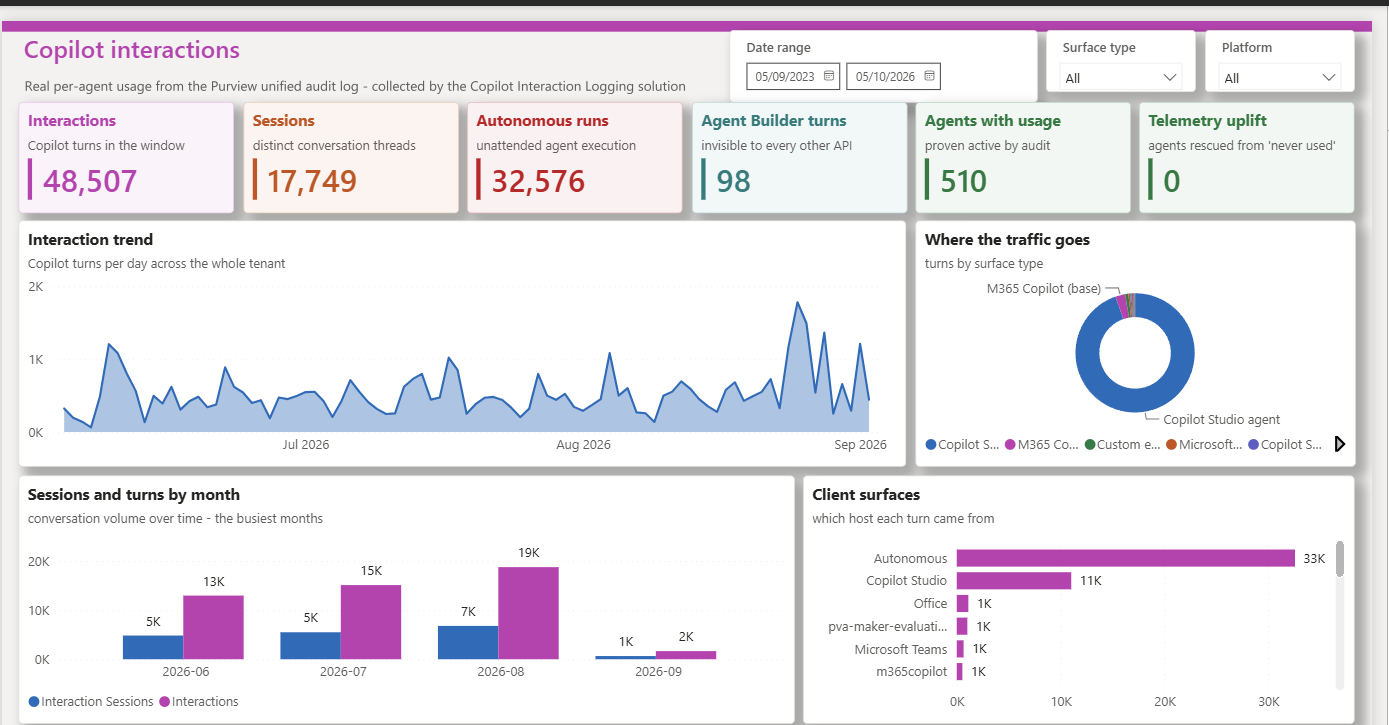
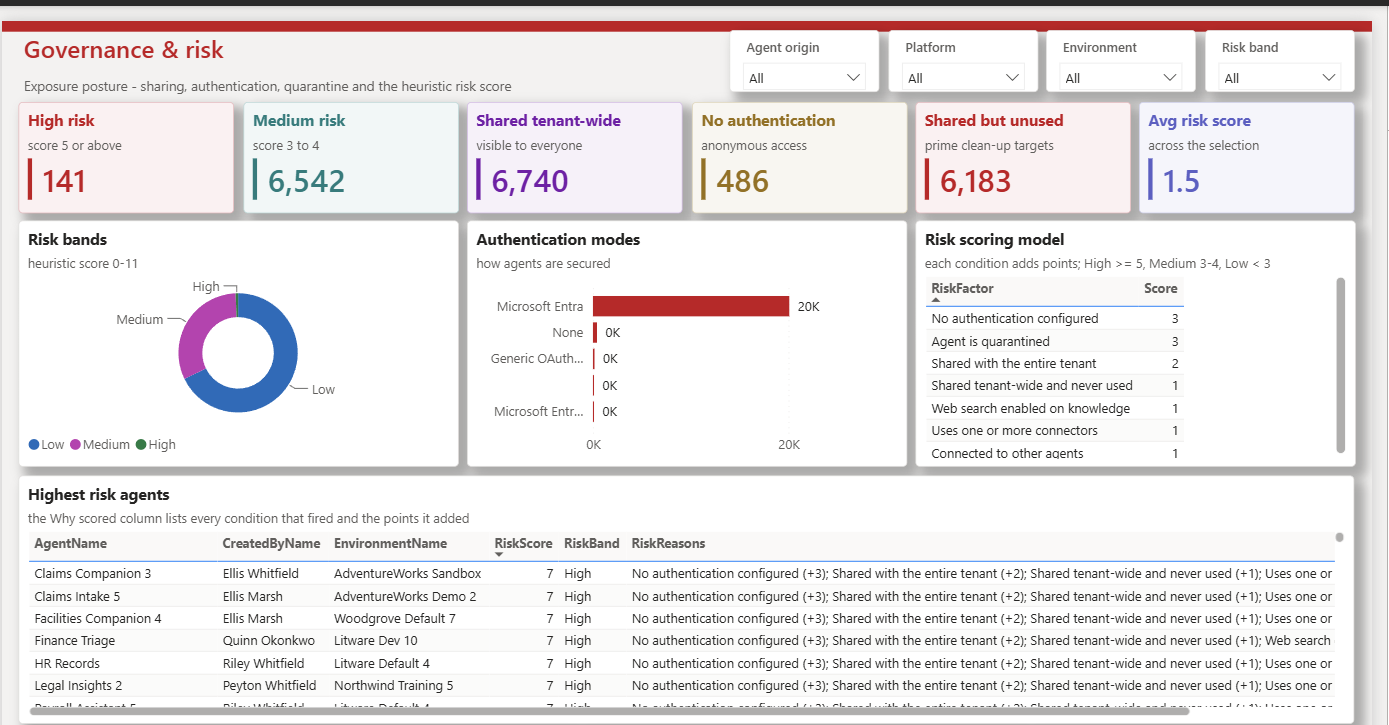
Screenshots from a working build
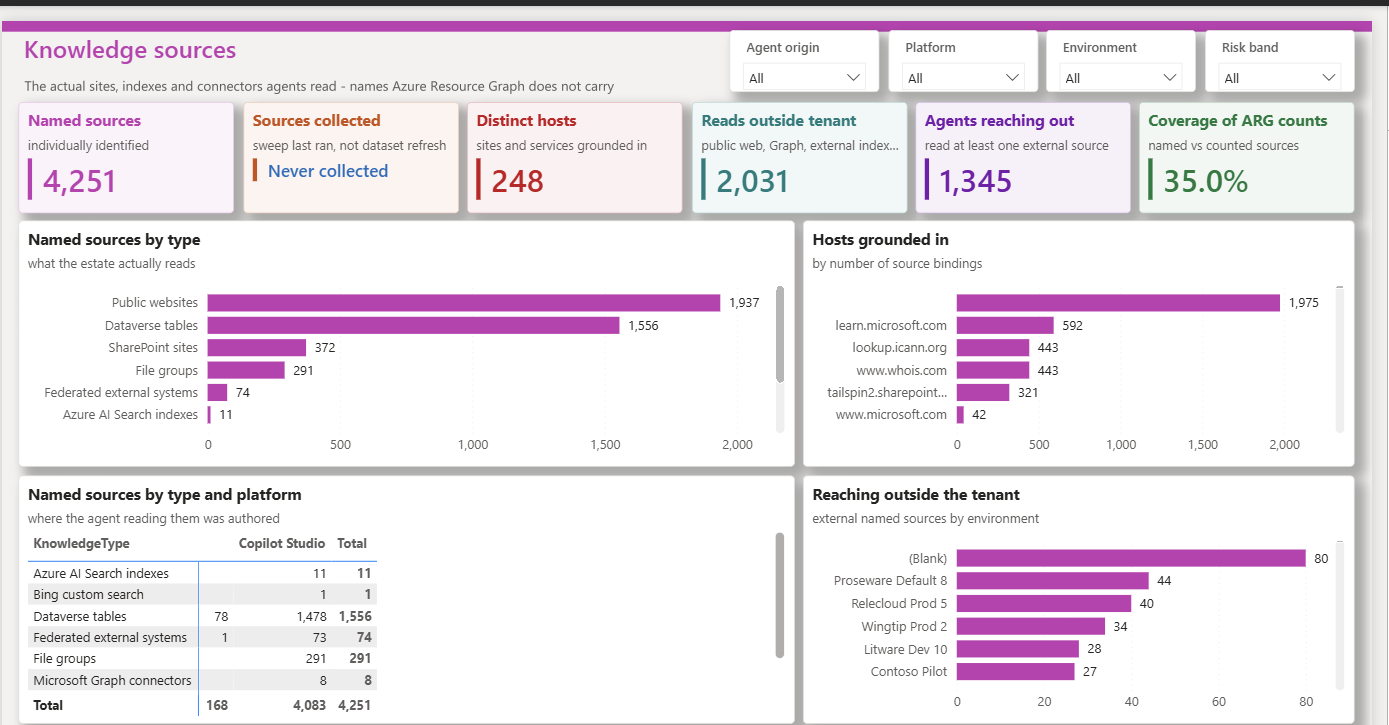
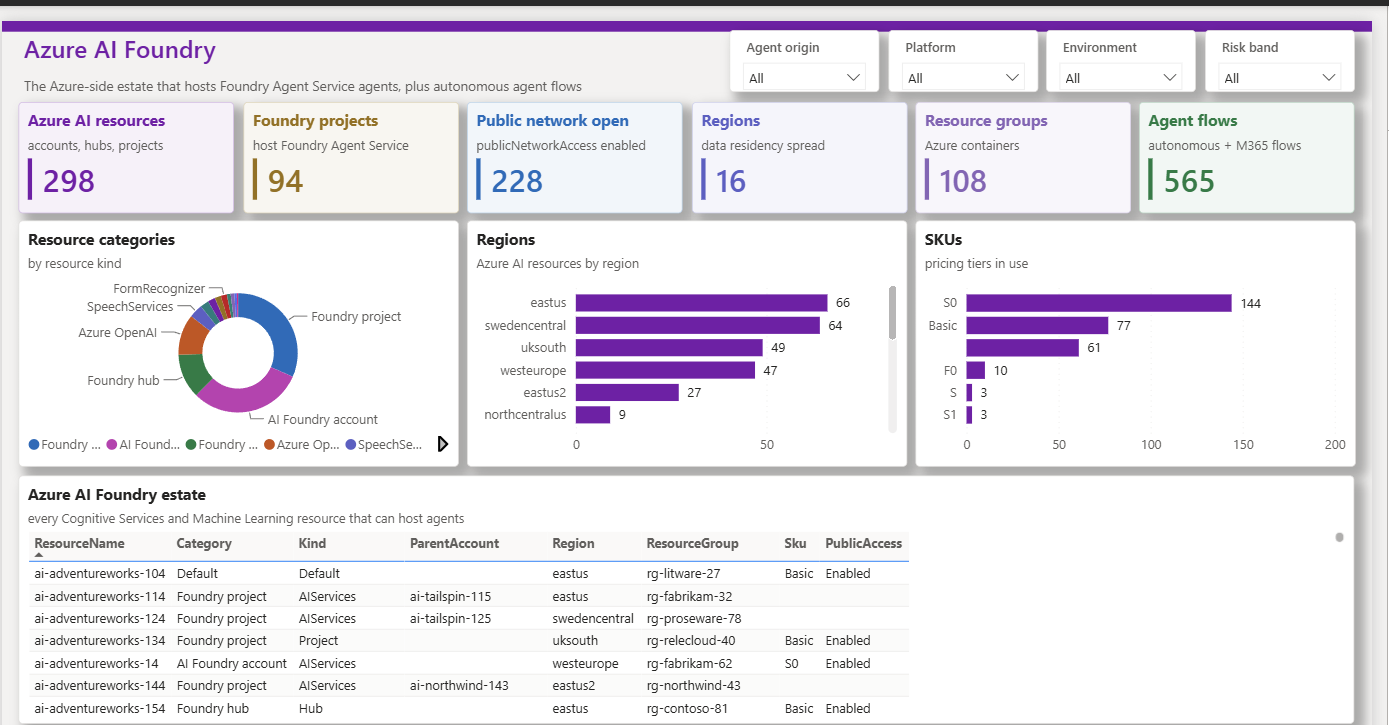
Six of the 16 report pages from a working build. Names are fictitious and figures are indicative only. Select an image to enlarge it, or a caption to see which lanes feed that page.
 (enlarge)
 (enlarge)
 (enlarge)
 (enlarge)
 (enlarge)
 (enlarge)
The other ten pages have no screenshot. Each one links to the lanes that feed it:
How it fits together
Architecture at a glance
Read-only Microsoft APIs feed one Power BI semantic model. Three lanes go straight into the model at refresh. The other three need a small daily collector, because Power BI can't call those APIs itself. The collectors all run in one reporting environment and write their rows there, so the model needs only one Dataverse connection, however many environments the tenant has.
- Read-only. It never changes an agent. The only writes are the collectors' rows in your own Dataverse, plus lane D's application user in each environment if you use its provisioning flow.
- Three connectors. Azure Resource Graph, Dataverse (one OData feed, to the reporting environment) and the Web connector for Defender advanced hunting. The model never calls Purview or Power Automate.
- No gateway. Every source refreshes in the Power BI service; see Refresh without a gateway.
- Dataverse is a convenience. Azure SQL Database or a Fabric lakehouse would work as the collector store too. Only the collectors' write step and the model's data-access function would change.
- Data first, generated from code. The pages were designed around what the APIs actually return, and the semantic model and report are generated from code, so a rebuild is repeatable.
One reporting environment, one Dataverse connection
Every Power Platform environment has its own Dataverse. The model could loop OData.Feed over them, but a URL built at refresh is a dynamic data source that the service won't refresh, and each environment would need its own credential. So the lane D flow runs in one reporting environment, sweeps every environment in its manifest and copies the rows there. Lanes C and E write to the same environment, and lane B reads its systemuser table, so the model holds a single Dataverse connection with a static URL.
A new environment is picked up by the next sweep once it has the application user (the optional provisioning flow adds it), with no change to the model.
One route among many
This is a custom build. It shows that the data can be collected, and it's only one of several ways to get agent data. There may be more effective ways to get some of it, and new or changed APIs may replace a lane over time, especially where a lane relies on preview or beta endpoints.
If you have Microsoft Agent 365, data from its APIs, such as the Graph API for agent registry and agent details, would complement this design, for example as the inventory source alongside or in place of lane A. Whichever sources you combine, the solution stays custom: you own and maintain it. See Not a replacement for Microsoft Agent 365.
Data
Six collection lanes
Lanes A, B and F need nothing installed: the semantic model queries them at refresh. Lanes C, D and E need a small collector, because Power BI can't call those APIs directly (see Collectors).
| Lane | Collects | How | Model connects to |
|---|---|---|---|
| A – agent inventory | Copilot Studio and Agent Builder agents, Foundry projects, agent flows and environments | Power BI queries Azure Resource Graph at refresh | Azure Resource Graph connector |
| B – owner and creator identity | Display names for creators and owners | Dataverse at refresh | systemuser in the reporting environment |
| C – interaction telemetry | Per-turn usage from the Purview audit log, including SharePoint agents | A daily flow writes to Dataverse, built with Copilot Interaction Logging (see lane C) | Dataverse |
| D – named knowledge sources | The sites, indexes and connectors each agent reads | A daily sweep of botcomponents (component type 16) in every environment, copied into the reporting environment | Dataverse |
| E – SharePoint agent inventory | .agent files: current or deleted, names, sites and URLs | A daily flow over file-operation audit records | Dataverse |
| F – Shadow AI on endpoints | Unsanctioned AI desktop tools on managed devices | Defender advanced hunting at refresh | Web connector to api.security.microsoft.com |
Lane B – resolving names
- Names come from the reporting environment's
systemusertable. Any Dataverse role that can read it is enough, such as Basic User. - It only covers principals that exist in that environment. Microsoft Graph
directoryObjects/getByIdswould cover the whole directory, but it isn't gateway-free from Power BI. - Relabel the null GUID
00000000-0000-0000-0000-000000000000as "System / platform" before the lookup, or it shows as a blank creator. - Agent Builder creators resolve fully. Foundry projects carry no creator at all.
- The names are denormalised onto the Agent table (
CreatedByName,OwnerName,OwnerUpn), so visuals don't need a second hop.
Companion solution
Interaction logging (lane C)
Lane C has its own build guide
The interaction collector is documented separately on the Copilot Interaction Logging site, with a step-by-step build guide and no package to install. It explains every action in both flows and why it exists, the secret-handling decision (Azure Key Vault is recommended, or a certificate; a plain-text variable isn't recommended) and the environment variables, so you can build, secure and maintain the collector in your own environment.
What lane C adds to the model:
- Surface classification. Each audit record is classified by its
AppIdentity: Copilot Studio agent, Microsoft 365 Copilot (base chat), custom engine agent, Microsoft first-party agent, Copilot Studio (other), Fabric or Power BI copilot, personal agent, Agent Builder agent, Teams Toolkit agent, declarative agent, or Agent Builder authoring. - Autonomous runs. A large share of agent activity can be autonomous, triggered by events rather than people, so "active users" alone understates usage.
- Per-turn timestamps. The audit log is the only source of per-turn timestamps. Sessions are a distinct count, so monthly session figures don't add up to the total.
- Agent Builder. Records join to inventory through
Copilot.Studio.Declarative.T_<titleId>. The title ID only exists once an agent is published, so drafts never join. - SharePoint agents. The identity
SPO_…_<drive item id>decodes to the file'sListItemUniqueId, which joins to lane E.
Operational notes
- Audit records can lag by up to about 24 hours, so each collection window ends well short of now.
- A skipped day doesn't heal itself. Re-run the collector for the missing window.
- If you store the client secret in a plain-text environment variable, remove its current value before you export the solution, because exports include it.
Out-of-band
Collector patterns
Three lanes need a collector: a scheduled Power Automate flow that calls an API Power BI can't call, and writes the result to Dataverse tables in the reporting environment, which the model then reads. All three collectors run in that environment, including Copilot Interaction Logging, so their tables sit side by side.
| Aspect | Lane C – interactions | Lane D – knowledge sources | Lane E – SharePoint agents |
|---|---|---|---|
| Adds | Who used which agent, when and how often | Which site, website or index each agent reads | Which .agent files exist, and their state |
| Why Power BI can't read it | A POST-only, asynchronous audit API, with a token audience the Web connector can't request | One Dataverse per environment, so reading them all would need a computed (dynamic) data source and a credential for each environment | The same asynchronous POST API, and the records need grouping |
| Permissions | AuditLogsQuery.Read.All (application), with admin consent | No API permissions; an application user in each environment | The same permission, so it can reuse lane C's app; no Sites.Read.All |
| Pages empty without it | Copilot interactions and usage uplift | Knowledge sources | SharePoint agents inventory |
That's two app registrations in total: an audit app shared by lanes C and E, and a knowledge-sweep app for lane D. Defender uses the report owner's own credentials in Power BI, so it needs no app.
Lane C – interaction collector
- Credential Get the app registration's credential: a client secret held in Azure Key Vault or a plain-text environment variable, or a certificate. Which one is your decision.
- Window Choose a window that ends well short of now, to allow for audit ingestion lag.
- Query POST the audit query, then poll until it completes.
- Page and upsert Page through the results and upsert each record on its audit record ID, so a re-run never duplicates rows.
- Log Write a run-log row with counts and errors.
Every HTTP call has a retry policy. Copilot Interaction Logging documents every action in the tested flow and why it exists, so you can build it yourself.
Lane D – knowledge-source sweep
- Get the credential and open a run-log row.
- Read the manifest of environments the app can reach.
- Build a key-to-row-ID index of existing rows. The Dataverse connector only updates by primary-key GUID and refuses alternate keys.
- Sweep environments 20 at a time, with one GET per environment on
botcomponents, expandingparentbotid. - Extract each source's name, kind and locator from the component YAML with a single Select action.
- Write rows 8 at a time to the reporting environment's Dataverse.
- Tombstone missing sources only after a clean run. The guard re-reads error and fresh-row counts from Dataverse, because counters updated inside concurrent loops aren't reliable.
- Close the run log.
Lane D – provisioning the application user
The sweep needs an application user in every environment it reads. An optional provisioning flow keeps that list current:
- Scope. Target either the environments that contain agents (from Azure Resource Graph) or every environment with Dataverse. The Resource Graph route needs Reader at the tenant root management group, because
PowerPlatformResourcesrows are tenant-scoped, with an emptysubscriptionId. - Grants. List the environments, subtract those already in the manifest and call
addAppUserfor the rest. Prove each grant by signing in as the service principal and callingWhoAmI, because a 200 fromaddAppUseris optimistic. Record each proven grant, so the manifest doubles as the revocation list. - Run controls. What-if mode by default, a per-run cap applied before the loop, and idempotent, self-healing runs.
- HTTP and authentication. Each HTTP call turns off the asynchronous pattern and uses a 3-minute timeout. The flow uses a client secret, because the HTTP with Microsoft Entra ID connector isn't preauthorised for this API (
AADSTS65002). Register the service principal as a Power Platform admin management application. Don't rely on global discovery, which under-reports environments for app-only identities. After changing an environment variable, turn the flow off and on again.
System Administrator in every environment
addAppUser grants the System Administrator role, with no lower option. Treat the app's secret accordingly. Deleting the app registration revokes its access everywhere at once.
Lane E – SharePoint agent inventory
- Query
sharePointFileOperationaudit records with the keyword.agent(default look-back 180 days). - Poll until the query completes, then page through the results.
- Group by lower-case
ListItemUniqueId. If a file's latest operation is a delete or recycle, mark it deleted. - Upsert by row ID.
- Delete stale rows only after a successful, non-empty query with zero errors.
- Log the run.
The result is an inventory of what was observed within audit retention, not a census: an .agent file with no operation inside the window isn't seen.
Power BI
Gateway-free scheduled refresh
The model refreshes on a schedule in the Power BI service with no on-premises data gateway. Three rules make that work:
- Use certified connectors or static base URLs The service must be able to see every data source before refresh, so each one needs a fixed address.
- Navigate, don't concatenate A URL built at refresh time is a dynamic data source, which the service won't refresh.
OData.Feedhas noRelativePathoption, so open the service document and navigate to the table instead. - Organisational credentials and the Organizational privacy level Sign in to all three sources with an organisational account and set each one's privacy level to Organizational. Private trips the formula firewall when sources are combined.
| Source | Connector | Why this one |
|---|---|---|
| Azure Resource Graph | AzureResourceGraph.Query | The Web connector can't send an authenticated POST or request the Azure Resource Manager audience, https://management.core.windows.net |
| Dataverse | OData.Feed | The same audience problem rules out the Web connector. One static URL, to the reporting environment, covers lanes B to E |
| Defender advanced hunting | Web.Contents | A plain GET against a fixed host |
Defender, with a static host and the query passed as options:
Web.Contents(
    "https://api.security.microsoft.com",
[RelativePath = "api/advancedqueries", Query = [key = query]])For a regional host (uk., eu., us. or au.), edit the literal rather than parameterising it.
Dataverse, navigating from the service document:
let
    Source = OData.Feed("https://<org>.crm.dynamics.com/api/data/v9.2/"),
    Rows = Source{[Name = "<entityset>"]}[Data]
in
RowsSkip test connection for Defender
When you enter the Defender credentials in the service, tick Skip test connection. The API root returns 404, so the test fails even though refresh works.
Then set the schedule in the semantic model's settings; see Configure scheduled refresh.
Model
Semantic model
A star schema with the agent at the centre: 21 tables, grouped below by what they hold.
Main tables
| Group | Tables |
|---|---|
| Inventory | Agent (one row per agent per environment, across all platforms), Environment, AgentFlow, AzureAIResource, SharePointAgent |
| Configuration | AgentConnector (with an IsMcpServer flag), AgentKnowledge, KnowledgeSource |
| People | User |
| Usage | Interaction (one row per turn) and CopilotSurface, loaded from the interactions table that Copilot Interaction Logging writes (lane C). |
| Risk | RiskFactor, RiskDetail |
| Coverage | ApiCoverage and TelemetryCoverage: static reference tables held in the model |
| Shadow AI | A watchlist-driven tool catalogue, signals and devices |
| Support | Date, Metrics |
Where the Usage tables come from
Copilot interaction usage is the one part of the model captured by Copilot Interaction Logging, a companion site with a build guide. Two Power Automate flows read the Purview audit log through Microsoft Graph and write metadata to three Dataverse tables. The model reads the interactions table at refresh to build Interaction and CopilotSurface, and the activity columns on Agent (LastActivityAt, ActivityStatus). The flow-run and error tables are for monitoring the collector.
It's one example of a capture method, not a requirement. The same audit records could reach the model from the Microsoft Sentinel CopilotActivity table, the Office 365 Management Activity API or a store you already run. Only the model's data-access step would change.
Relationships
- Agent and AgentFlow relate to Environment.
- AgentConnector, AgentKnowledge, KnowledgeSource and RiskDetail relate to Agent.
- Agent relates to User once, through the owner, and
RELATEDfills the owner name and UPN. The creator name is aLOOKUPVALUEin a calculated column, so it needs no second relationship. Interaction[SurfaceKey]relates to CopilotSurface, andInteraction[AgentKey]to Agent.CopilotSurface[SharePointAgentKey]relates to SharePointAgent.Interaction[Date]to Date is active.Agent[CreatedDate]andAgent[LastUsedDate]to Date are inactive and used through USERELATIONSHIP, because two active paths to Date are ambiguous and Power BI Desktop refuses to load the model.
Fallback labels
Every lookup has a visible fallback: Unlisted: <id>, "Unknown", "Not specified" (kept distinct from "Copilot Studio default") and "Agent no longer in inventory". A blank sorts first in most visuals and looks like a fault.
Lineage
Which table feeds which page
The model has 21 tables and 13 relationships, with Agent at the hub. Every Dataverse table it reads sits in one reporting environment, so it holds one Dataverse connection however many environments the tenant has. Lane C is required: the model expects the interactions table to exist. Lanes D and E are optional and load as empty tables until their collectors first run, and lane F loads empty if Defender for Endpoint isn't licensed or refuses the refresh account. The static reference tables are held in the model itself.
The main tables, their lanes and where they come from
Each page number links to that page's row in the next table, which names it. A filled number, like 1, has a screenshot further up; an outlined one, like 2, doesn't.
| Table | Lane | Holds | Comes from | Used on pages |
|---|---|---|---|---|
| Agent | A | One row per agent across Copilot Studio, Agent Builder and Azure AI Foundry, with owner, activity and risk columns | Azure Resource Graph, at refresh: agents, environments, usage records and Foundry projects | Page 1: Executive overview (screenshot)Page 2: All agentsPage 3: Agent analyticsPage 4: Agent inventory (screenshot)Page 5: Creators & ownershipPage 6: Usage & popularityPage 7: Copilot interactions (screenshot)Page 9: Adoption & activityPage 10: Governance & risk (screenshot)Page 11: Tools & integrationPage 12: Knowledge & groundingPage 13: Knowledge sources (screenshot)Page 14: Azure AI Foundry (screenshot)Page 15: Data sources & gaps |
| Environment | A | Power Platform environments | Azure Resource Graph, at refresh | Page 9: Adoption & activityPage 13: Knowledge sources (screenshot)Page 15: Data sources & gaps |
| AgentConnector | A | One row per agent and connector, including MCP server tools | Azure Resource Graph, at refresh | Page 11: Tools & integration |
| AgentKnowledge | A | One row per agent per knowledge-source type; for Agent Builder agents it's the only integration surface | Azure Resource Graph, at refresh | Page 12: Knowledge & groundingPage 13: Knowledge sources (screenshot) |
| AgentFlow | A | Autonomous agent flows and Microsoft 365 agent flows | Azure Resource Graph, at refresh | Page 14: Azure AI Foundry (screenshot)Page 15: Data sources & gaps |
| AzureAIResource | A | Foundry accounts, hubs and projects | Azure Resource Graph, at refresh | Page 14: Azure AI Foundry (screenshot) |
| RiskDetail | A | Each risk factor that fired for each agent, with its points | Computed in the model from Agent and the RiskFactor rules | Page 10: Governance & risk (screenshot) |
| User | B | Display name, UPN and principal type for owners and creators | Dataverse systemuser in the reporting environment | Page 1: Executive overview (screenshot)Page 2: All agentsPage 3: Agent analyticsPage 4: Agent inventory (screenshot)Page 5: Creators & ownershipPage 6: Usage & popularityPage 9: Adoption & activityPage 10: Governance & risk (screenshot)Page 11: Tools & integrationPage 12: Knowledge & groundingPage 13: Knowledge sources (screenshot)Page 14: Azure AI Foundry (screenshot) |
| Interaction | C | One row per Copilot turn: time, user, surface, agent, thread and resources | The interactions table that Copilot Interaction Logging writes in the reporting environment (required) | Page 1: Executive overview (screenshot)Page 2: All agentsPage 3: Agent analyticsPage 4: Agent inventory (screenshot)Page 5: Creators & ownershipPage 6: Usage & popularityPage 7: Copilot interactions (screenshot)Page 8: SharePoint agentsPage 9: Adoption & activity |
| CopilotSurface | C | Every distinct app identity in the audit log, classified by surface and matched to the inventory | The same table (app identities only), matched against Agent and SharePointAgent | Page 7: Copilot interactions (screenshot)Page 8: SharePoint agents |
| KnowledgeSource | D | One row per named source an agent reads: SharePoint site, public website, Graph connector or Azure AI Search index | A collector table in the reporting environment, swept daily from every environment (optional) | Page 13: Knowledge sources (screenshot) |
| SharePointAgent | E | .agent files: current or deleted, names, sites and URLs | A collector table in the reporting environment (optional) | Page 8: SharePoint agents |
| ShadowAiSignal | F | Detections in three layers: installed, executed and network | Defender advanced hunting, through the Web connector | Page 16: Shadow AI (endpoints) |
| ShadowAiDevice | F | Device-level detail for each detection | Defender advanced hunting, through the Web connector | Page 16: Shadow AI (endpoints) |
| RiskFactor | Static | The risk rules and the points each one scores | Static table held in the model | Page 10: Governance & risk (screenshot) |
| ApiCoverage | Static | Results of the live-tested APIs | Static table held in the model | Page 15: Data sources & gaps |
| TelemetryCoverage | Static | Which monitoring signals each platform exposes, which explains gaps in usage figures | Static table held in the model | Page 6: Usage & popularityPage 15: Data sources & gaps |
| ShadowAiCatalog | Static | The watchlist of AI tools to look for | Static table held in the model | Page 16: Shadow AI (endpoints) |
| Date | Model | A calendar from a start parameter to the end of next month | Generated in Power Query at refresh | Page 1: Executive overview (screenshot)Page 3: Agent analyticsPage 6: Usage & popularityPage 7: Copilot interactions (screenshot)Page 9: Adoption & activity |
| Metrics | Model | The report's calculations; no data of its own | Defined in the model | All 16 |
The lanes behind each report page
The report has 16 pages and 287 visuals. A dot means the page reads a table from that lane. A ring means it reaches the lane only through Agent columns or measures. A blank means the page doesn't use the lane.
| Page | Visuals | Lane A Inventory | Lane B Identity | Lane C Interactions | Lane D Knowledge | Lane E SharePoint | Lane F Shadow AI | Lane Static Reference | Screenshot |
|---|---|---|---|---|---|---|---|---|---|
| Page 1: Executive overview | 23 | Direct | Through Agent columns or measures | Direct | View the Executive overview screenshot | ||||
| Page 2: All agents | 17 | Direct | Through Agent columns or measures | Direct | |||||
| Page 3: Agent analytics | 16 | Direct | Through Agent columns or measures | Direct | |||||
| Page 4: Agent inventory | 17 | Direct | Through Agent columns or measures | Through Agent columns or measures | View the Agent inventory screenshot | ||||
| Page 5: Creators & ownership | 18 | Direct | Through Agent columns or measures | Through Agent columns or measures | |||||
| Page 6: Usage & popularity | 18 | Direct | Through Agent columns or measures | Through Agent columns or measures | Direct | ||||
| Page 7: Copilot interactions | 18 | Direct | Direct | View the Copilot interactions screenshot | |||||
| Page 8: SharePoint agents | 19 | Direct | Direct | ||||||
| Page 9: Adoption & activity | 20 | Direct | Through Agent columns or measures | Through Agent columns or measures | |||||
| Page 10: Governance & risk | 20 | Direct | Through Agent columns or measures | Direct | View the Governance & risk screenshot | ||||
| Page 11: Tools & integration | 18 | Direct | Through Agent columns or measures | ||||||
| Page 12: Knowledge & grounding | 19 | Direct | Through Agent columns or measures | ||||||
| Page 13: Knowledge sources | 19 | Direct | Through Agent columns or measures | Direct | View the Knowledge sources screenshot | ||||
| Page 14: Azure AI Foundry | 19 | Direct | Through Agent columns or measures | View the Azure AI Foundry screenshot | |||||
| Page 15: Data sources & gaps | 12 | Direct | Direct | ||||||
| Page 16: Shadow AI (endpoints) | 14 | Direct | Direct |
Two lanes reach more pages than they appear to
Owner and creator names from lane B are calculated columns on Agent, and Agent's activity status uses the latest interaction from lane C as well as Resource Graph's last-used date. So a page that shows only Agent fields still depends on both lanes. A ring marks those pages in the matrix.
CopilotSurface is also built from lanes A and E: each app identity is matched against Agent and SharePointAgent at refresh, so interactions carry an agent name only when one of those lanes holds a match.
Classification
Origin and risk scoring
Origin
Origin is the first slicer on every page, because platform scaffolding otherwise drowns out the agents people actually built.
| Origin | Rule | Examples |
|---|---|---|
| Platform-provisioned | Created by the null GUID | Scaffolding, template copies and system bots |
| Human-built | The creator resolves to a real principal | Agents that people built |
| Creator unknown | No creator is recorded | All Foundry projects |
"Creator unknown" is kept separate on purpose: folding it into either of the other two would overstate one of them.
Risk score
Each agent gets points for the conditions below. The total sets its band, and a RiskReasons column explains the score, for example "No authentication (+3); Shared with entire tenant (+2)".
| Condition | Points |
|---|---|
| No authentication | +3 |
| Quarantined | +3 |
| Shared with the entire tenant | +2 |
| Shared tenant-wide and never used | +1 |
| Web search turned on | +1 |
| Uses connectors | +1 |
| Connected to other agents | +1 |
Bands: High 5 or more · Medium 3–4 · Low under 3.
A heuristic, not an assessment
The score ranks agents for review; it doesn't prove that an agent is safe or unsafe. Tune the weights and conditions to your own policies before you rely on it.
Completeness
Platform coverage
| Platform | Inventory | Configuration | Usage |
|---|---|---|---|
| Copilot Studio | Full | Full | Full Inventory usage fields plus the audit log |
| Microsoft 365 Agent Builder | Full createdIn = "Copilot Studio Lite" | Full | Audit only |
| SharePoint agents | Observed Within audit retention (lane E) | Partial File, site and URL | Audit |
| Microsoft Foundry (formerly Azure AI Foundry) | Projects only Depends on Azure RBAC | Partial | None |
| Agent flows | Full | Full | Partial |
Completeness checks
- A single Azure Resource Graph type holds all the Copilot Studio and Agent Builder agents.
createdInhas exactly two values, and their counts add up to the total.- Power Platform rows aren't filtered by Azure RBAC. What you see depends on the signed-in user's admin role instead, so a user without one gets a partial list with no error.
Activity
LastActivityAt is the later of the inventory's last-used date and the latest audit record for the agent. An agent only counts as unused when both are silent.
What it can't see
- Agents surfaced as Microsoft 365 apps: the app catalogue (
/appCatalogs/teamsApps) wasn't reachable in this build. - Agents deleted since they were used. Their audit records show as "Agent no longer in inventory".
.agentfiles with no file operation inside audit retention.- Agents inside Foundry projects, which need data-plane roles on each project.
In this build, most audit interactions resolved to an inventoried agent. Most of the rest were base Microsoft 365 Copilot chat and Microsoft first-party agents, which have no inventory row to join to.
Gotchas
Lessons from the build
Lessons from building against the real APIs. Each one cost time to find, and most aren't obvious from the documentation.
Azure Resource Graph pages silently
Results come back 1,000 rows per page. Order by id so paging is stable, follow $skipToken until it's gone, and reconcile the row total against a single summarize count() query. See Paging results.
Detecting MCP servers needs a regex
To flag connectors that are MCP servers, match the serialised tool list with matches regex '"type":"MCP"'. A plain contains test was unreliable in this build.
entraAgentId is not entraAppId
The two properties identify different directory objects. Never join on one as if it were the other.
knowledgeByType gives counts, not names
The inventory record counts each kind of knowledge (graphConnectors, dataverseSources, publicSites, files, fileGroups, sharepointSites, powerPlatformConnectors, bingCustomSearch and teamsMessages) but doesn't name the sources. Lane D supplies the names.
The inventory record is rich
Each agent's Resource Graph record carries about 31 properties, covering authentication, sharing, quarantine, connectors, knowledge counts, connected agents, instructions and usage. Most of the governance pages are built from this one record.
Agent Builder agents live in the same table
They're distinguished by createdIn = "Copilot Studio Lite". Their titleId, which joins audit records to inventory, only exists once an agent is published.
SharePoint agents are .agent files
They have no Resource Graph record. Lane E builds their inventory from file-operation audit records, and lane C's SPO_…_<drive item id> identity decodes to the same ListItemUniqueId, which links usage to the file.
Foundry shows projects, not agents
Resource Graph lists Foundry projects. The agents inside them sit behind each project's data plane, which needs per-project roles, so the report counts projects only.
Avoid CALCULATE in calculated columns
CALCULATE triggers context transition, which makes the column depend on every other column in the table. The result can be a circular dependency or a column that's silently blank. Use MAXX(FILTER(…)) instead. A build-time check enforces this rule.
Run-time is a floor
Agent run-time is measured as elapsed time per conversation thread per day. Treat it as a lower bound, not a precise figure.
Guard deletes with fresh counts
Before a collector deletes or tombstones rows, it re-reads error and row counts from Dataverse rather than trusting variables updated inside concurrent loops. A failed or partial run then can't empty a table.
Instruction text isn't collected
An agent's instruction text only exists in the YAML of botcomponent type 15, which this build doesn't collect. Whether an agent has instructions comes from Resource Graph instead.
Endpoints
Shadow AI on managed endpoints
Lane F uses Microsoft Defender advanced hunting to look for unsanctioned AI tools on managed devices, through three layers of evidence.
| Layer | Table | Proves | Limits |
|---|---|---|---|
| Installed | DeviceTvmSoftwareInventory | A packaged app is present | Misses portable, per-user and installer-free tools |
| Executed (30 days) | DeviceProcessEvents | The tool ran, and who ran it, including command-line tools such as Claude Code and GitHub Copilot CLI | Misses tools that weren't launched in the window |
| Network (30 days) | DeviceNetworkEvents | The device reached an AI service | The broadest layer, and the only one that sees browser use, but contact isn't proof of use |
- One watchlist drives both the queries and the tool catalogue, so an empty page means "none found", not "not checked".
- Whether a tool is sanctioned is your own policy, held in the watchlist.
- The vendor match is left blank for Microsoft, Google, GitHub and Hugging Face, whose names are too broad, so those tools match on product name alone.
- The longest term wins, so "GitHub Copilot CLI" matches before "Copilot".
Watch for false positives
Developer packages such as node-cli-cursor and restore-cursor matched the term "cursor". The fix was a server-side name-prefix match combined with a vendor match.
A floor, not a census
Results only cover devices onboarded to Defender for Endpoint; unmanaged and personal devices are invisible. Defender for Cloud Apps Cloud Discovery is complementary and isn't wired into this build.
Access
Permissions
Everything is read-only apart from the collectors' own tables. Each lane needs only the access listed here.
| Area | Identity | Permission |
|---|---|---|
| Inventory (lane A) | Signed-in user | Power Platform Administrator, Global Reader or AI Administrator. Without one of these roles, Resource Graph silently returns partial results. |
| Foundry projects | Signed-in user | Reader on each subscription, or at the Tenant Root Group. Granting it at the root may first need a Global Administrator to elevate access. |
| Names (lane B) | Signed-in user | A Dataverse security role that can read systemuser in the reporting environment |
| Interactions (lane C) | App registration | AuditLogsQuery.Read.All (application) with admin consent; AuditLog.Read.All isn't enough. Unified audit logging must be on, and history starts from when it was turned on. Without consent, the API returns 401. |
| SharePoint agents (lane E) | App registration | The same permission, so reuse lane C's app |
| Knowledge sources (lane D) | App registration | No API permissions. An application user in each environment, with System Administrator (see Collectors). |
| Power BI | Report owner | Power BI Pro, Premium Per User or a Fabric capacity, plus organisational credentials for the three data sources |
| Shadow AI (lane F) | Signed-in user | Security Reader or an advanced hunting role, on a tenant with Defender for Endpoint |
What it can't do
It can't create, edit, turn off, delete or run agents, and it doesn't read prompts or responses. The only writes are the collectors' rows in your own Dataverse. The exception is lane D's optional provisioning flow, which adds an application user with System Administrator to each environment.
Suggested order
Each step lights up more of the report, so you can start small:
- Power Platform Administrator Inventory, configuration and risk pages.
- Subscription Reader Foundry projects.
systemuserread Creator and owner names.- Audit app Interactions, usage and SharePoint agents.
- Knowledge-sweep app Named knowledge sources.
- Security Reader (optional) Shadow AI.
Before you build
Limitations and upkeep
Plan for upkeep
This is a custom build, so it needs an owner in your organisation: someone to watch the flows, rotate credentials, repair breakages when APIs change and answer questions about the numbers. Microsoft doesn't support it.
- Preview and beta APIs.
PowerPlatformResourcesin Azure Resource Graph is new and lightly documented, and this build called the audit log query API on the Microsoft Graph beta endpoint. Either can change without notice. - Schema drift. New properties, renamed values and new Copilot surfaces all need model changes.
- Audit retention and lag. Usage history is limited by your audit retention, and records can arrive up to about a day late.
- Credential rotation. Client secrets expire. A lapsed secret stops the collectors quietly unless you alert on the run log.
- Coverage gaps. Some agents can't be seen at all; see Coverage.
- Heuristic risk. The score ranks agents for review and is no more than that; see Origin and risk.
- Shadow AI is a floor. Only managed, onboarded devices are covered; see Shadow AI.
- No support. It isn't a Microsoft product, so there's no support channel, service level or roadmap.
- Agent Builder drafts don't join. Usage can't be linked to an agent until it's published.
- Agents inside Foundry projects aren't counted. Only the projects are.
- Counts drift. Inventory, audit and Defender data refresh at different times, so totals on different pages can differ slightly. The screenshots show one tenant at one point in time and are indicative only.
How it was built
Origins
Built with GitHub Copilot
GitHub Copilot was used to produce the solutions that extract the data for this model. That includes the Copilot Interaction Logging flows behind lane C, which pull CopilotInteraction records from the Purview audit log into Dataverse. After a manual first build, later versions of those flows were made with GitHub Copilot, using the skills in the Power Automate plugin from microsoft/power-platform-skills.
Treat the design as a demonstration of what a custom build can do, and review every query, flow and permission before you rely on it. Lane C began as an adaptation of the audit log flows in the CoE Starter Kit; see Origins and credit in its build guide.