Copilot Studio / field reference
Community project, built with GitHub Copilot. Not a Microsoft product.
Template-aligned documents in
Copilot Studio’s Standard and GitHub Copilot harnesses
Editable Word and PowerPoint drafts, built with prepared templates. A candid record of what worked, what is still staged, and what failed.
- Community projectBuilt with GitHub Copilot; not a Microsoft product
- MIT licenceProvided as is, no warranty or SLA
- Native solution ZIPImported with warnings; runtime not verified
- Prepared templatesReusable inputs, not completed outputs
- Human reviewRequired before adoption
Word + Long PowerPoint workPrepared Standard routes, with qualifications
Three-choice extension is stagedShort and image routes are not end-to-end proved
New Word content, prepared layoutA different Word design needs maker setup first
Read this first
Community project, shared as-is.
This site documents a community reference implementation, built with GitHub Copilot and shared under the MIT licence, and the evidence gathered from it. It is not a Microsoft product, is not supported by Microsoft and does not come with an SLA or warranty.
Before importing anything: test in a non-production environment first, get your organisation's approvals, review the solution contents, configure your own connections and storage, and decide whether the approach is appropriate for environments that hold real data.
The MIT licence permits reuse, but it does not provide support, fitness guarantees, security approval, production readiness or rights to excluded templates and private comparison files. You are responsible for assessing, operating and securing anything you deploy from this site.
Architecture
Prepared templates are explicit contracts.
The documented Standard route separates drafting, rendering and review. The comparison cases remain useful, but they are not interchangeable with a deployed, configured Standard implementation.
01 / Results and readiness
Different routes. Different proof.
The original request was for the Standard harness, not the GitHub Copilot harness (GHCP). Later attachment-driven comparisons are separate experiments, not replacements for that requirement.
Can I use my own Word template?
Yes, after a maker prepares it. This working implementation accepts a new subject, context and requested content for a previously prepared Word layout. It is not a one-step “upload any DOCX and follow its layout” route. New content is dynamic; a new design is setup/engineering work. See the template onboarding steps.
This describes the integration demonstrated here, not a product-wide restriction on Standard harness agents. The original ad-hoc Word comparison is a separate experiment, not proof that the prepared flow accepts arbitrary templates.
Standard / editable Word
Supply a new subject, context and requested content; the saved drafting prompt and Power Automate populate a previously prepared Word layout to produce an editable document. A different organisational template must be onboarded by a maker first, not simply uploaded in the chat.
Standard / Long11 PowerPoint
The registered eleven-slide route handles user-requested subjects, supplied context, public research and same-conversation single-slide revisions. Creation05 and revision06 are successful retained outputs.
Standard / three presentation choices
Separate, readable creation topics for Short5, Long11 and Short5withImages, plus shared research and revision handling. The new picker frontend is staged, not deployed or natively accepted.
GHCP / Astra published batch
The published agent delivered nine originals through the published M365 channel: three Word, three Short PPT and three Long PPT. The stop request queued until the tester turn ended; all nine ran after the stop.
GHCP / GPT55Chat Word
One pre-publication Studio Preview request. Six native pages and six editable tables, but 32 instructional paragraphs remain. A separate inspection copy passed edit/save/reopen; the original was not repaired.
GHCP / GPT55Chat Short PPT
One specifically authorised post-publication request in a fresh Studio Preview conversation. Five visible slides preserve the structural design, but five template instructions remain on slides 2 and 5.
No model leaderboard. Models, channels, tools and preparation differ. Observed GHCP cases handled ad-hoc attachments more flexibly, but exact template fidelity and content completion are not assured. These cases do not establish universal reliability or equivalent quality.
Prepared Standard Word / actual document pages
Prepared Standard Word: template and actual output
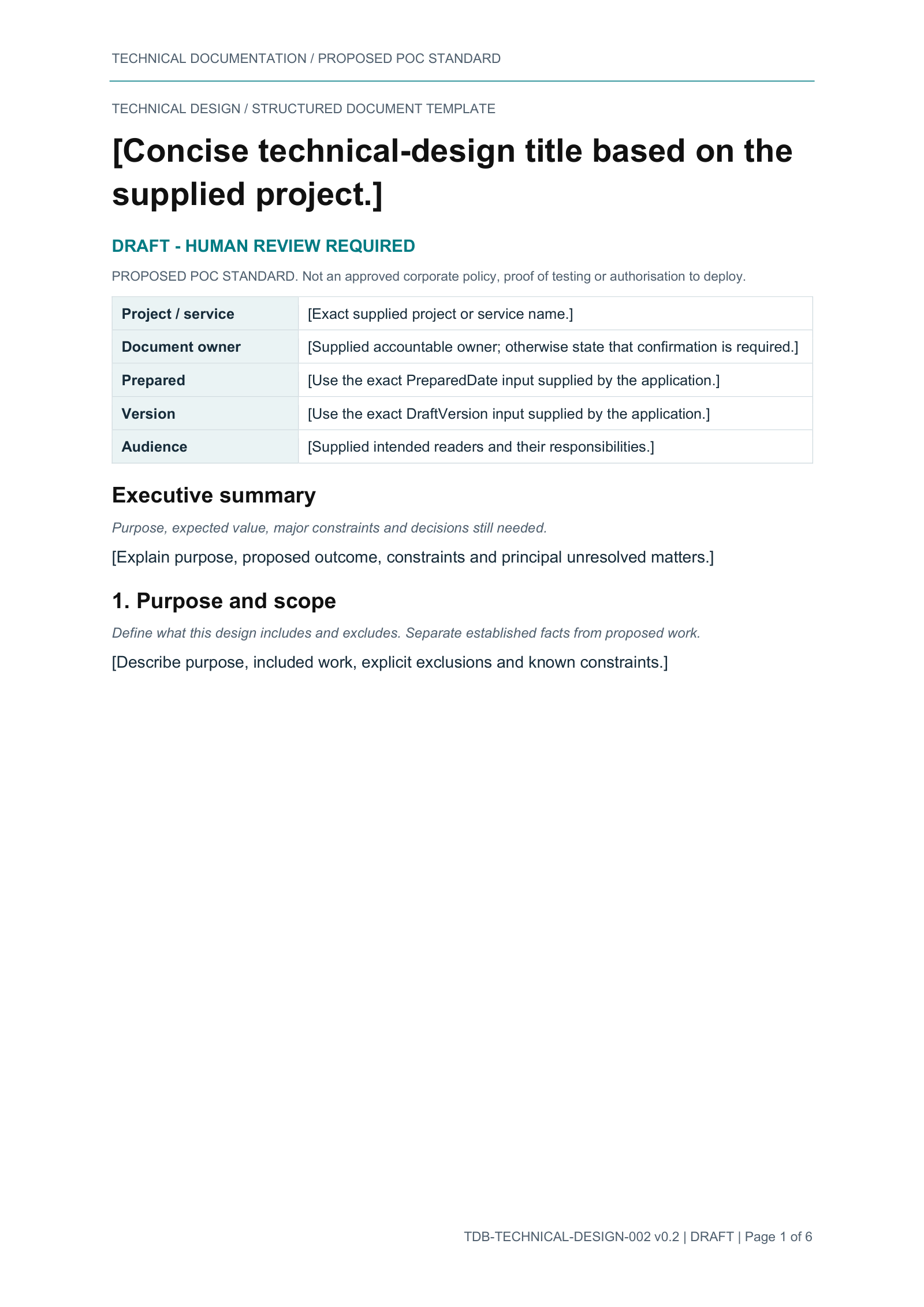
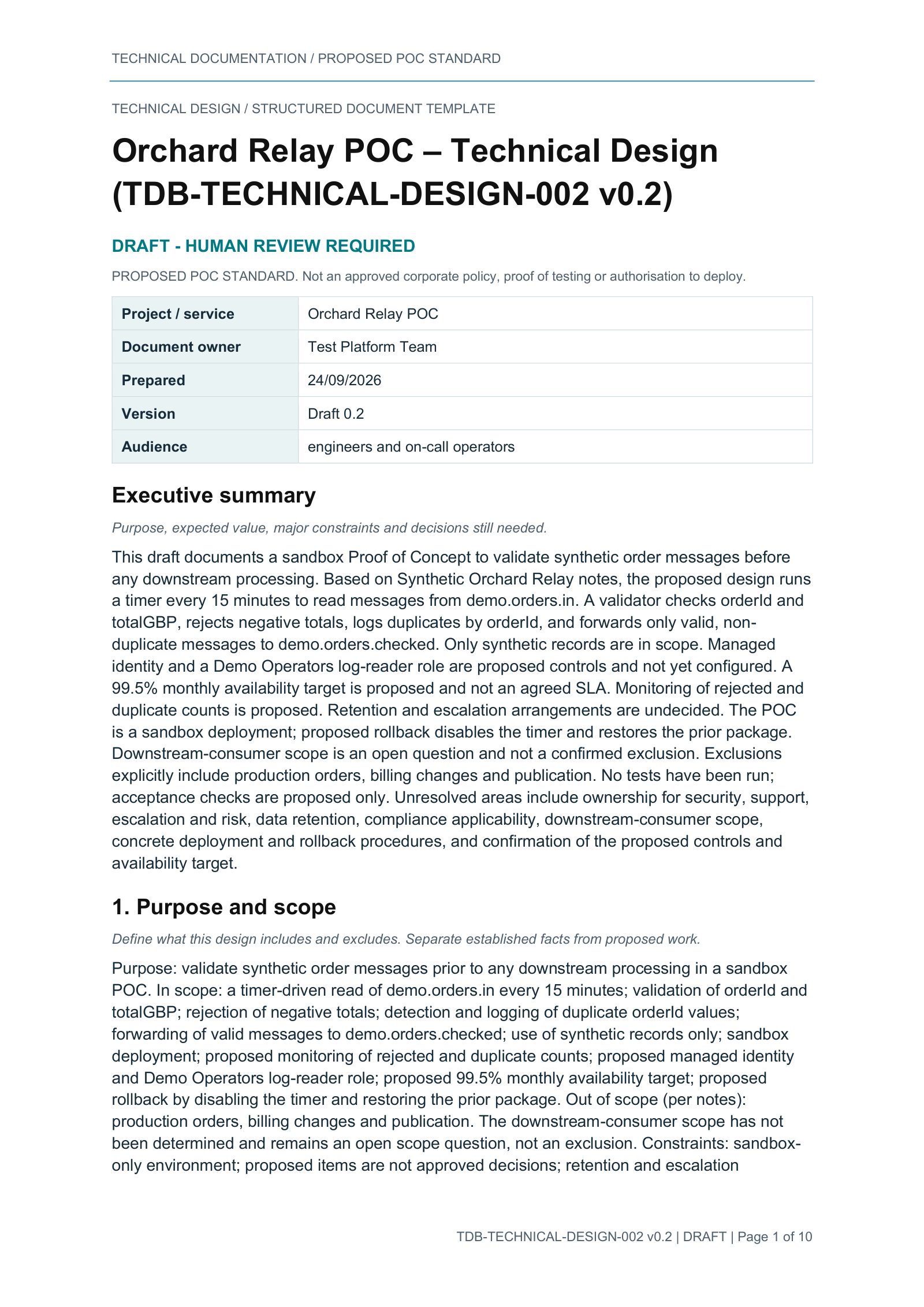
The genuine v0.2 template and its Orchard Relay POC output from 24 September 2026. This is the prepared Standard integration, not the separate 3-page/3-table ad-hoc Word experiment below.
The historical workflow used two authorised drafting calls, review and refinement, cancel/resume, then one separately confirmed document creation. The actual output has 10 native pages and 6 tables. Historical structural checks passed, and a separate QA copy passed native edit/save/reopen; factual approval was withheld.
Document control and opening content
Compare the same opening fields and headings. Template placeholders are intentional; the output's longer body continues onto page 2.
Prepared template / page 1 of 6
Actual Standard output / page 1 of 10
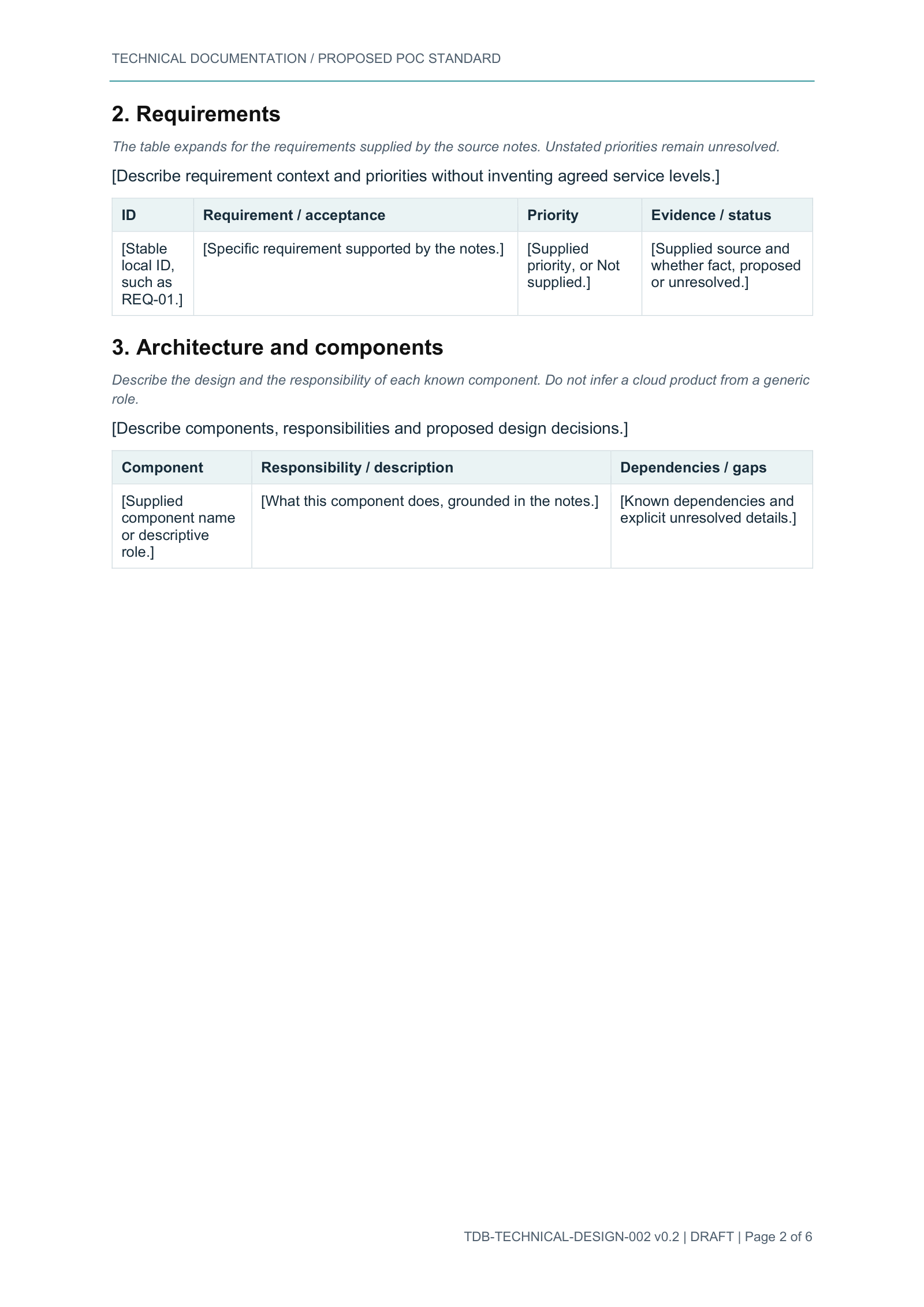
Repeating requirements table
Logical sections align, not page numbers: requirements begin on template page 2 and output page 3. The expanded output table continues on page 4.
Prepared template / page 2 of 6
Actual Standard output / page 3 of 10
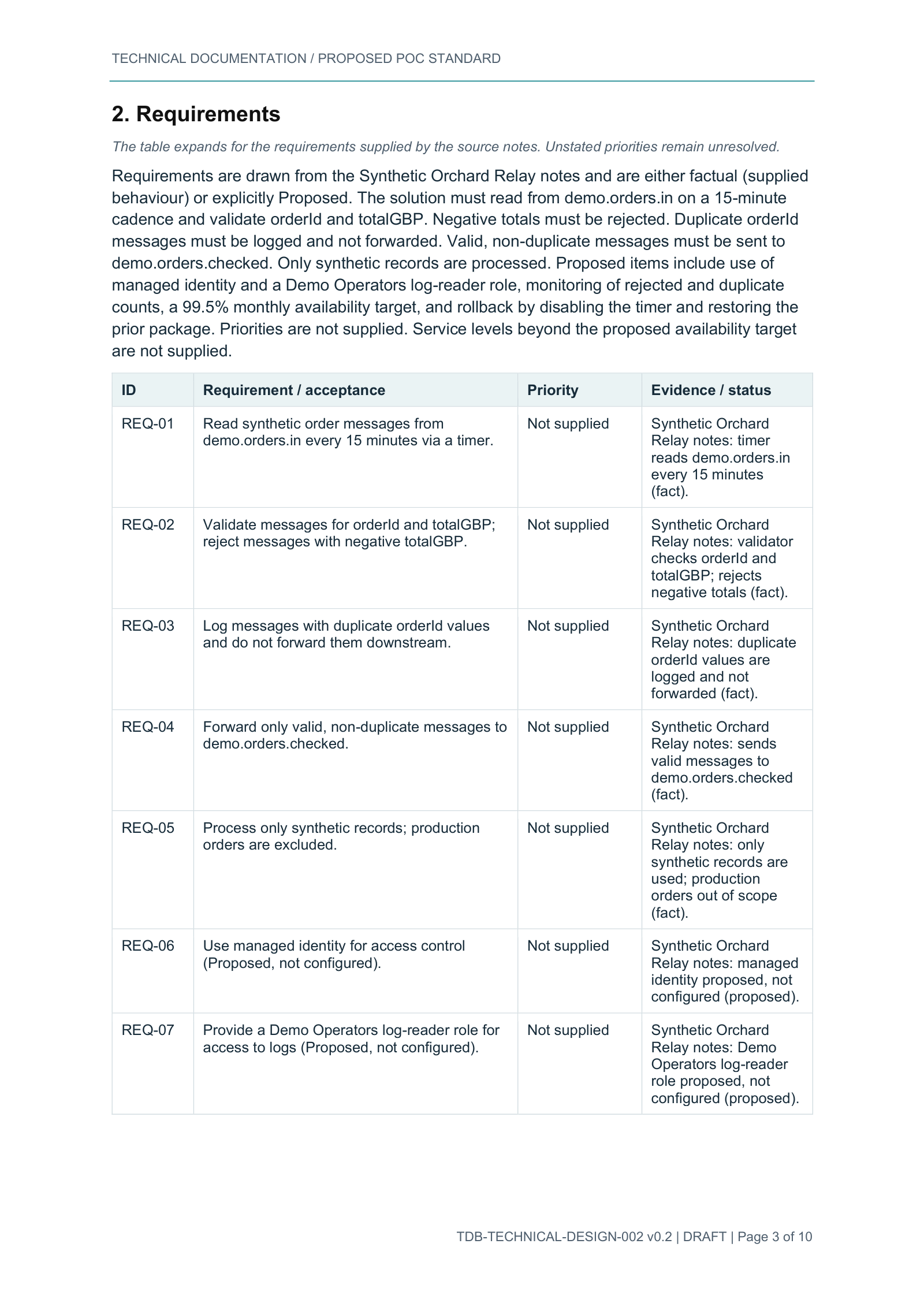
Representative pages, not complete quality proof. Review found proposed design presented as fact in requirements rows, inferred queue/topic classifications elsewhere, and an acceptance-test condition that omits the non-duplicate requirement. Dense text, page continuations and static instructional guidance remain as generated. These screenshots do not establish exact factual alignment, full content completion or production approval. Human factual, layout and editability review remains required.
The two original input/output comparisons
Template, context, conversation, result.
The original request supplied a Word PID template with a separate source PDF, then a PowerPoint template for a technical introduction to Copilot Studio. These are not the later starter templates or the pets example.
Conversation evidence is public; these original binaries are not. The exact input names, actual requests/final replies and reviewed results are paired below. Their downloadable template/output sets remain incomplete pending public-sharing clearance. No substitute template or newly generated output is presented as the original.
Word PID: one template, one factual source, two actual outputs
Layout template: Sample-PID-Contoso-Horizon.docx.
Factual context: Sample-PID-Northwind-FieldService.pdf (not a second Word template).
Both historical arms used identical input bytes and the same request, with configured Claude Sonnet 4.6. One request per arm; no correction turns. The existing GHCP C03 output was reused, not regenerated.
Separate ad-hoc-template experiment: the native/direct Standard Sonnet request used the uploaded layout and returned an incomplete 3-page/3-table document. That is not the prepared content-control integration above, nor proof that it can populate arbitrary newly uploaded templates.
| Case and channel | Actual delivered file | Review boundary |
|---|---|---|
| Standard Sonnet / unpublished native Test chat | 39,429-byte DOCX; 3 native pages, 3 editable tables. | Ends after section 2.1, despite the final response claiming a complete, exact-template PID. Formatting and unsupported assertions also need correction. |
| GHCP Sonnet C03 / Studio Preview | 47,637-byte DOCX; 13 native pages, 14 editable tables. | Substantially more complete, but headers/footers, table formatting, diagram placeholders and factual grounding have defects. Not template-exact or factually approved. |
Actual shared request and qualified final-answer excerpts
User / same request in both armsCreate a Word Project Initiation Document for Northwind Field Service Modernisation. Use Sample-PID-Contoso-Horizon.docx as the template for layout, styles, structure and tables, and Sample-PID-Northwind-FieldService.pdf as the factual source. Replace the Contoso/Horizon example content with Northwind content; mark missing details as 'To be confirmed'. Return the new editable .docx as a downloadable file.
Standard / final-answer claim, not an accepted verdictThe .docx follows the Contoso/Horizon PID template structure exactly, with all Northwind content substituted throughout:
GHCP C03 / final-answer excerptPID-Northwind-FieldService-Modernisation.docx — attached and ready to edit.
Copilot Studio technical briefing: native comparison and prepared-route success
Visual template: Copilot session.pptx, the supplied eleven-slide Microsoft 365 Copilot design. No separate factual source attachment was supplied for the native comparison. The later engineered route registered those same template bytes in advance.
| Case and channel | Observed outcome | Interpretation |
|---|---|---|
| Standard Sonnet / unpublished native Test chat | Template accepted and style analysis completed; terminal SystemError. No PPTX. | One native attempt. Underlying cause unknown; not a permanent capability limit. |
| GHCP GPT 6 Astra / Studio Preview | 91,796-byte PPTX; 11 editable slides with strong individual-slide fidelity. Slides 6–11 remain hidden. | Default slideshow shows 5 slides. Harness distinctions are omitted; current-release guidance is not certified. Models differ from the Standard arm. |
| Engineered Standard technical case05 / Classic-routed native Test chat | 85,800-byte PPTX; 11 visible slides. One draft and one renderer; structural/visual reviews passed with qualifications. | Prepared template, saved prompts, flow bindings and supplied rendering code. GPT-5 reasoning drafted content; renderer configured GPT-5 chat. Not arbitrary-template ingestion. |
Actual native-comparison request and terminal replies
User / shared request excerptCreate a new editable 11-slide PowerPoint presentation introducing Microsoft Copilot Studio to a technical audience. Use the attached Copilot session.pptx as the visual template: preserve its theme, slide size, fonts, colours, branding, layout patterns and editable shapes.
Standard Sonnet / terminal error excerptSorry, something went wrong. Error code: SystemError. Conversation ID: [REDACTED conversation identifier]. Time (UTC): 9/25/2026 7:40:02 PM.
GHCP Astra / final replyCreated the editable 11-slide presentation, preserving the template’s theme, branding and varied layouts. Availability-dependent features are flagged, and the original is unchanged.
Separate successful engineered Standard technical case05 conversation
User / prepared-route request excerptCreate a new editable 11-slide PowerPoint presentation introducing Microsoft Copilot Studio to a technical audience. Use the registered Copilot session.pptx as the visual template: preserve its theme, slide size, fonts, colours, branding, layout patterns and editable shapes.
Standard technical case05 / actual final replyOpen or download the PowerPoint draft [REDACTED private delivery URL]
Filename: [REDACTED private generated filename]
This editable presentation is a draft and requires human review for accuracy, completeness and layout. The link uses existing access; no sharing permissions were changed. It was created from the registered Copilot session.pptx template, not arbitrary newly attached PPTX binaries.
02 / The successful Standard example
Cats, dogs, and one carefully isolated revision.
A real request for an eleven-slide introduction to everyday pet care. A later request changed only slide 9 and its notes. Useful outputs deserve recognition without erasing failed attempts.
One draft call and one renderer. All 158 paragraphs transferred unchanged. The original is 86,155 bytes; retained all-slide visual review passed with minor cautions.
768 characters exceeded the 650-character limit. No render, file or successful-state replacement. Creation05 stayed intact; no silent retry.
A new recorded request after guidance-only changes delivered a distinct 86,093-byte deck in the same conversation. Only slide 9 and its notes differ; notes are 368 characters.
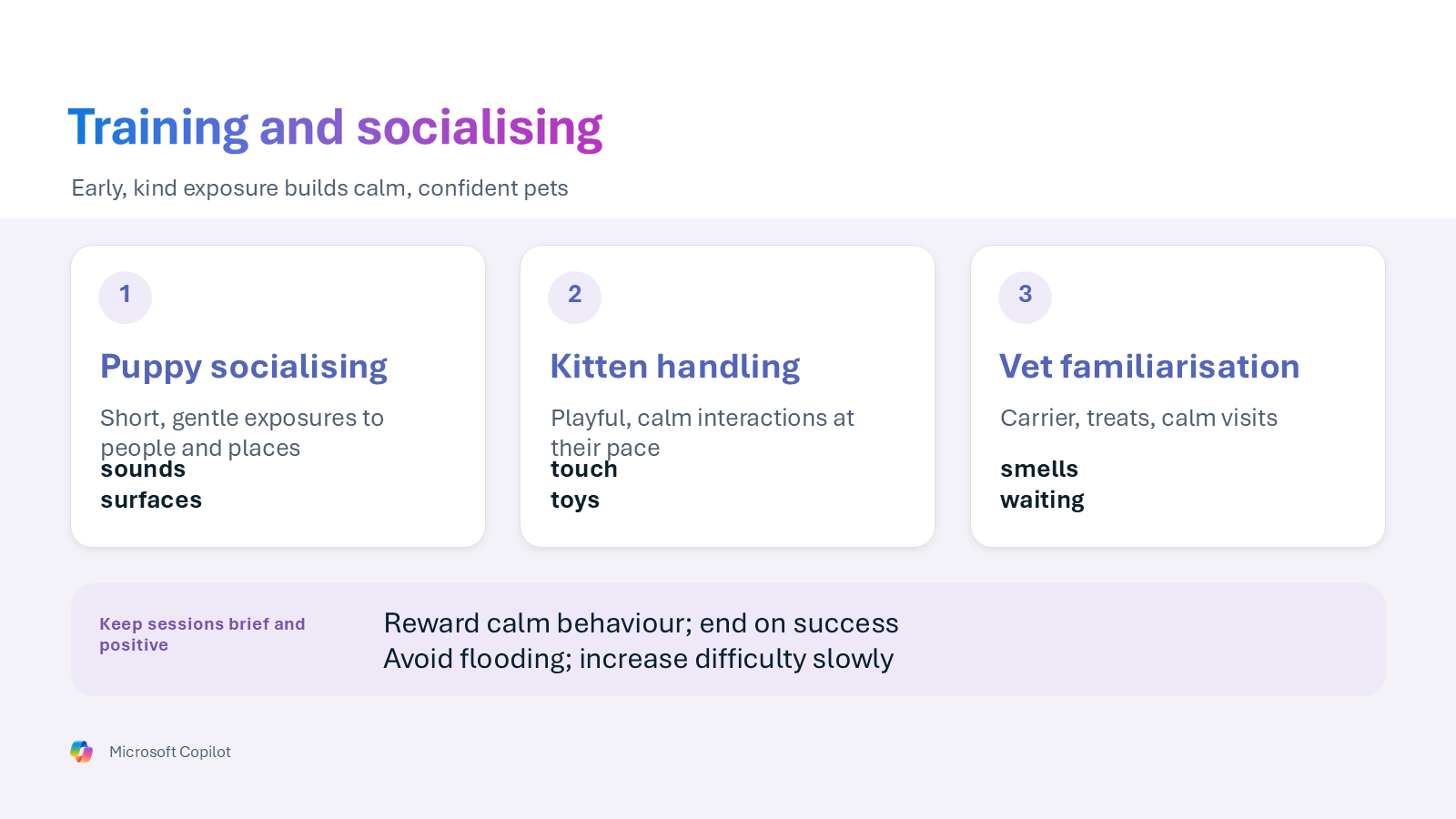
Creation05 / actual output
Before: training and socialising
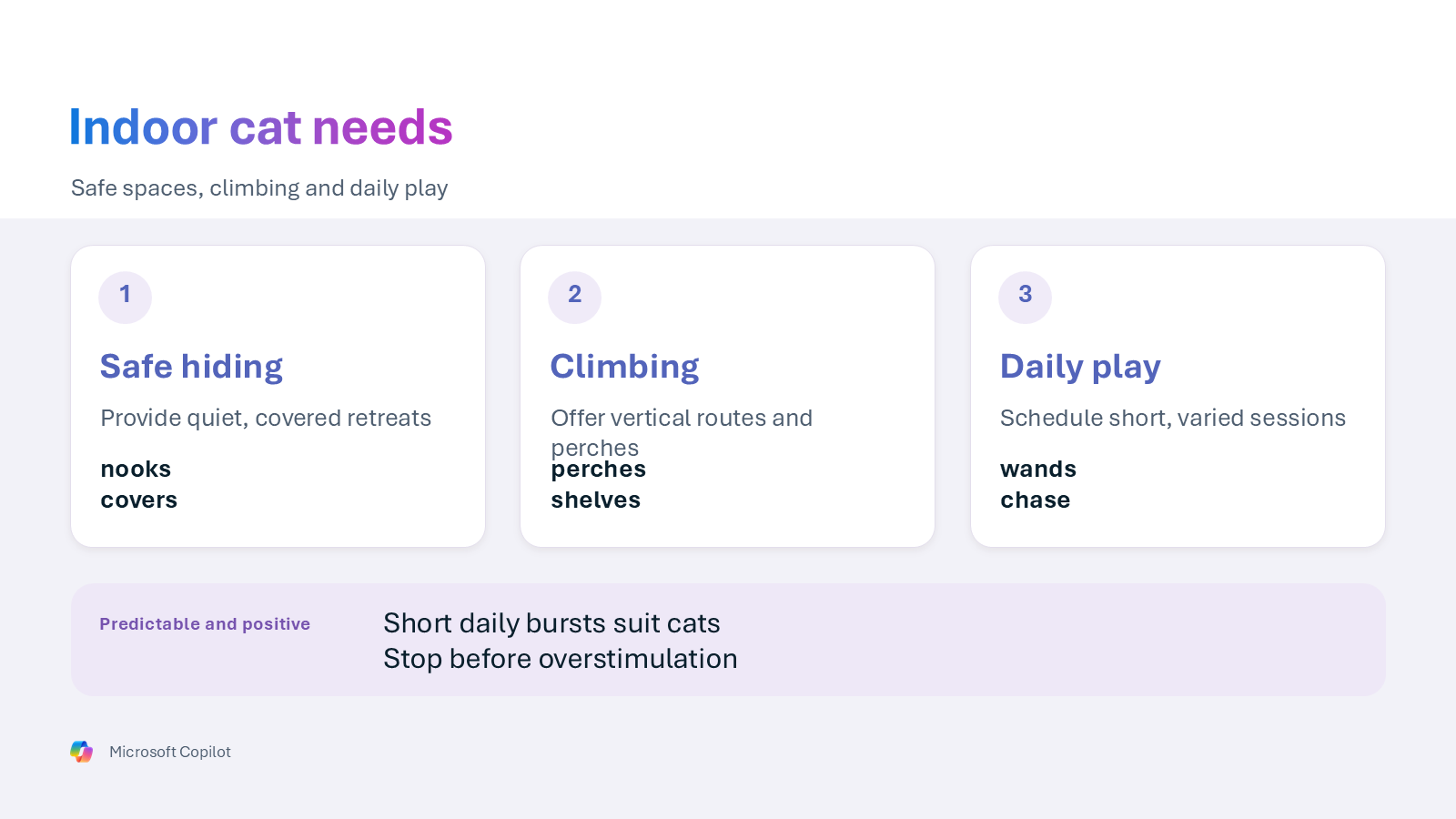
Revision06 / actual output
The requested cat-focused slide 9
Actual request and final answer excerpts
User / creation05Create an editable PowerPoint about everyday care for cats and dogs using the existing registered eleven-slide template. Research public sources to support the content. Supplied organiser context: this is a 25-minute introductory session for ten first-time pet owners at Harbour Learning Club. Include practical comparisons and end with three useful questions to ask a vet. The club details are supplied context, not web facts. Internal test marker [REDACTED private test marker] must not appear in the deck or any public search query.
User / revision06Update slide 9 to focus on cats rather than dogs. Make its main points about safe hiding places, climbing opportunities and daily play for indoor cats. Update the speaker notes to match and support factual guidance with the available research. Keep every other slide and the template design unchanged, and give me a new PowerPoint file rather than replacing the original.
Agent / revision06 final answerDownload the redacted conversation excerpts (TXT)Open or download the new PowerPoint draft [REDACTED private delivery URL]
Filename: [REDACTED private filename]
This editable draft requires human review for factual accuracy, completeness and fit. Existing access is used; no sharing permissions changed. The fixed G/C/S/E badges and template branding remain unchanged. Only slide 9's content and notes were revised; the previous file remains available.
Actual outputs, separate owner-approved public-release copies. The owner approved public sharing of these two named files, prepared and saved in native PowerPoint. These are not the byte-identical benchmark originals; the originals remain private and unchanged. This approval does not extend to the withheld original comparison set.
Exact release-copy transformations and metadata boundary
Native personal-information removal cleared Author and LastModifiedBy. Generated text, notes, geometry, formatting, images and referential branding are retained. Native saving omitted eight empty text runs on slide 4; all other slide/notes XML content is equivalent. No content was repaired or regenerated. The fixed G/C/S/E badges remain inherited template design.
The manifest pins the exact release bytes and reviewed package metadata for these two copies. Approval is limited to those files; it is not a general metadata or identifier exemption. Native save/close/reopen, content comparisons and rendering checks do not establish factual accuracy or a new runtime result.
What the successful result does not prove
Creation05 was a new generation, not a local repair of the earlier praised creation03. The earlier creation03/revision03 pair remained on visual hold for overflowing slides. User praise did not override that result.
For revision06, nine render images matched creation05 exactly. Slide 2 had a small subtitle-rendering variation and was reviewed separately; package comparison still isolated changes to slide 9 and its notes.
Compact wording, repeated words, spacing and alignment need editorial attention. In the previews, creation05's puppy/kitten text crowds the bold keywords; revision06 repeats "perches" across tight lines. All-slide visual review found no conspicuous clipping or instructional placeholders, but source citations are not visible on the slides and branding text becomes small when downscaled. General source landing pages do not support every specific care claim. Microchipping summaries do not cover all thresholds or exemptions. This is neither veterinary nor legal approval.
Earlier native content-edit/save/reopen evidence applies to a marked QA copy of revision03. Release-copy checks here cover metadata cleanup, save/reopen, content/geometry preservation and rendering, not a new content-edit acceptance test of creation05/revision06. No live agent test was run for this public release.
03 / Reuse the approach, not the tenant
A template is an integration contract.
Conversation, research and revision logic can be reused. Each design still needs its own destinations, bounds, flow/topic bindings and quality review.
- Prepare the template contract. Add supported controls or mapped slide fields, freeze the file version and record the required template boundaries.
- Bind the environment. Configure destination connections, OneDrive folders, prompt settings and file IDs in the maker designer.
- Validate before activation. Test with synthetic data, preserve failed attempts and activate only the intended, fully configured routes.
- Review the output. Check factual accuracy, layout, editability, placeholders, governance and access before any real use.
Prepared Word
New content uses a prepared layout. To use a different organisational Word template in this implementation, a maker must first:
- Add supported, uniquely named content controls in Word's Developer tab, with repeating sections and named nested controls for dynamic table rows.
- Align the saved prompt's drafting schema and row-object keys with the flow's population mappings.
- Store and configure the exact template/version in the flow. Selecting that file in Populate a Microsoft Word template exposes its control schema; map fields and repeating-row arrays to it.
- Validate required fields and rows, then human-review rendered pages and a marked editable copy before accepting the new design.
See Microsoft's Word Online (Business) template and repeating-section guidance. Once that setup is complete, bind new authorised source notes to the saved drafting prompt. Validate narrative fields and typed table rows, add trusted application-owned date/version values, obtain creation consent for the reviewed draft and populate the prepared controls through Power Automate.
Compare actual output text, table rows, static headings, styles, headers and footers with the intended content. Native rendering and edit/save/reopen check things schema validation cannot. New content is dynamic; a new design is setup/engineering work, not a one-step upload-any-DOCX operation.
Prepared PowerPoint
Register the exact template version and map editable shapes and paragraphs. Keep generation within explicit field bounds, validate before rendering and transfer accepted text without silent truncation or repairs.
For a slide revision, retain the successful full draft and source file. Merge only the requested slide and notes after validation; return a new file. Failed validation must not replace the last successful state.
Human review is part of the workflow. Evaluate factual accuracy, completeness, readability, editability and data governance independently. Neither structural preservation nor file delivery certifies production readiness, compliance or approval.
| Choice | Prepared design | Runtime boundary |
|---|---|---|
| Short5 | Five slides, 40 editable text fields; authored and frozen. | Plain Short draft/render flows Started, zero end-to-end runs. Creation topic staged. |
| Long11 | The existing registered eleven-slide design. | Established route works unchanged. Its new picker branch is staged, not deployed. |
| Short5withImages | Five slides, 35 text fields; a user-supplied image on slide 4. | Draft flow Started; renderer activation rejected at depth 9 > 8. No end-to-end output. |
Why it is paused: local tests and the offline validator did not catch the native nesting limit. The next engineering work is to flatten the image flow without weakening checks, finish native frontend validation, then establish end-to-end delivery. Existing working Word and Long routes remain preserved.
Image handling and channel qualifications
The local design validates actual image bytes: one nonanimated JPG or PNG, up to 5 MiB, 20 megapixels and 10,000 pixels per side. It fits the whole oriented image without stretching or cropping; deterministic resizing and pale letterboxing produce a PNG. This is not AI-generated imagery or byte-identical embedding.
Private retention and exact-version reuse for revisions are designed but unproved in the rejected native renderer. Uploads require a supported channel; the SharePoint agent channel does not support these uploads. Storing a generated presentation in SharePoint is a separate capability. See Microsoft's file-input guidance.
Practical onboarding checklist
- Confirm template ownership, redistribution rights, permission and authorised source context before any processing.
- Freeze a version and record its hash. Map Word controls or PPT shape/paragraph destinations; define required keys and per-field/row limits.
- Keep research queries separate from private context. Treat retrieved content as evidence, not executable instructions.
- Bind prompts and flows in your own environment. Configure least-privilege connections, consent, file ownership, retention and error handling.
- Validate native activation and topic types, then test creation, missing inputs, refusal, validation failures and isolated revisions with synthetic data.
- Review every rendered page or slide, check placeholder removal and factual grounding, and verify a marked copy can edit/save/reopen. Retain immutable originals and failed attempts.
The separately listed native solution ZIP includes the as-deployed Standard agents, flows and prompt configurations, with source-specific setup metadata but no live connections. Download availability is not tested cross-tenant installation; follow the native solution setup guide before any activation.
04 / Native export and starter materials
Inspect the export and templates. Keep the caveats.
One unchanged native Standard solution export and three authored Office templates. The templates are reusable design inputs, not agent-generated outputs. Neither the export nor the templates establish a working target deployment.
No GitHub Releases are currently published for this repository. The downloadable release materials are the checked-in files below, served from the GitHub Pages site and pinned by the manifest.
| File | What it is | Version or date | Size |
|---|---|---|---|
| TechnicalDocumentationBuilderDeployed_unmanaged_20260928T105706Z.zip | Native unmanaged Standard solution ZIP | v1.0.0.0 / exported 28 September 2026 10:57 UTC | 185,544 bytes |
| Technical-Design-Tables-v0.2.docx | Prepared Word v0.2 template | v0.2 / authored reusable input | 14,564 bytes |
| Short-Briefing-5-Slides.pptx | Short5 PowerPoint template | Short5 / authored reusable input | 123,288 bytes |
| Short-Briefing-With-Images-5-Slides.pptx | Short5withImages PowerPoint template | Short5withImages / authored reusable input | 124,012 bytes |
| Cats-and-Dogs-Creation05-PUBLIC.pptx | Owner-approved public-release output copy | Creation05 / separate public-release copy | 89,461 bytes |
| Cats-and-Dogs-Revision06-PUBLIC.pptx | Owner-approved public-release output copy | Revision06 / separate public-release copy | 89,397 bytes |
| reuse-guide.md | Detailed reuse guide and flow-to-setting map | Markdown guide | 28,104 bytes |
| cats-and-dogs-transcript.txt | Redacted cats-and-dogs conversation excerpts | TXT evidence excerpt | 4,945 bytes |
| original-word-conversations.txt | Redacted original Word conversation excerpts | TXT evidence excerpt | 3,252 bytes |
| original-powerpoint-conversations.txt | Redacted original PowerPoint conversation excerpts | TXT evidence excerpt | 6,096 bytes |
| synthetic-context.txt | Synthetic practice context fixture | Newly authored public teaching fixture | 1,598 bytes |
Standard Word + Long PowerPoint / as-deployed solution
TechnicalDocumentationBuilderDeployed v1.0.0.0 / unmanaged ZIP / 185,544 bytes. Native export completed 28 September 2026 at 10:57 UTC from an export-only wrapper referencing unchanged deployed components: 2 agents, 39 agent components, 5 flows, 3 models with 6 configurations, 3 connection references, 9 flow associations and 1 direct Word connector association. No environment variables, redesigned renderer or installer are included.
Imported with warnings; target configuration pending; runtime not verified. A controlled second import attempt in a separate Developer environment succeeded on 28 September 2026 at 12:38 UTC. It used a fresh download of the same byte-identical public ZIP; staging passed with no missing dependencies. Native solution membership and schema checks verified the unmanaged v1.0.0.0 solution and expected inventory, with 62 solution-membership entries. All five flows were Off at verification, and all three saved prompt payloads matched the source/public export.
The successful import log recorded 18 success, 5 warning and 0 failure results. These are log results, not component counts. Warnings concern source Predict organization bindings and missing target Word Online (Business) / OneDrive for Business connections. Target configuration is ongoing; native import, connector binding, resource retargeting, template provisioning, prompt readiness, agent publishing and runtime acceptance remain separate steps.
Configure your own Dataverse, OneDrive for Business and Word Online (Business) connections and retarget the source-bound flow settings. Core Word uses the public v0.2 template; the optional legacy Word route needs a different v0.1 file. Long requires the exact original 98,985-byte template and all registered integrity/contract checks. Its required SHA-256 is 7c5858479154c2c5d20a2e8c636faddd252c90fbcd97acd209fa13880e21916b. That template is not included: a separately downloadable public-release copy is not compatible, and no guard has been removed. Without compatible authorised original bytes, leave Long disabled. This is not a plug-and-play or production-approved package.
Technical design / Word
Editable content controls, five repeating tables, a document-control table and explicit human-review notices. Proposed POC standard, not corporate policy.
Download Word templateShort briefing
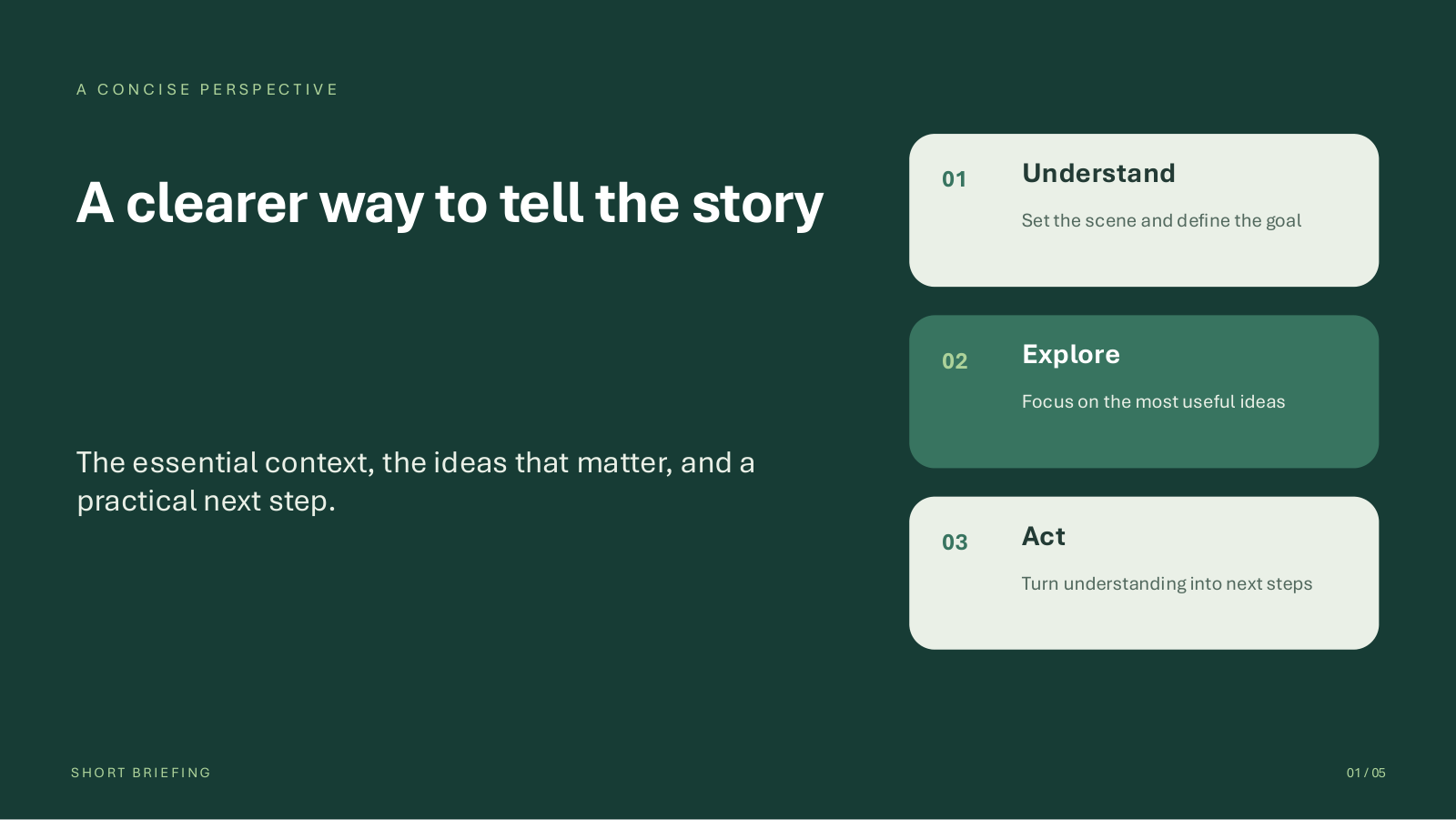
Five varied, editable layouts with 40 mapped text fields. Instructions deliberately remain in this template; they must not remain in a completed output.
Download Short templateShort briefing with images
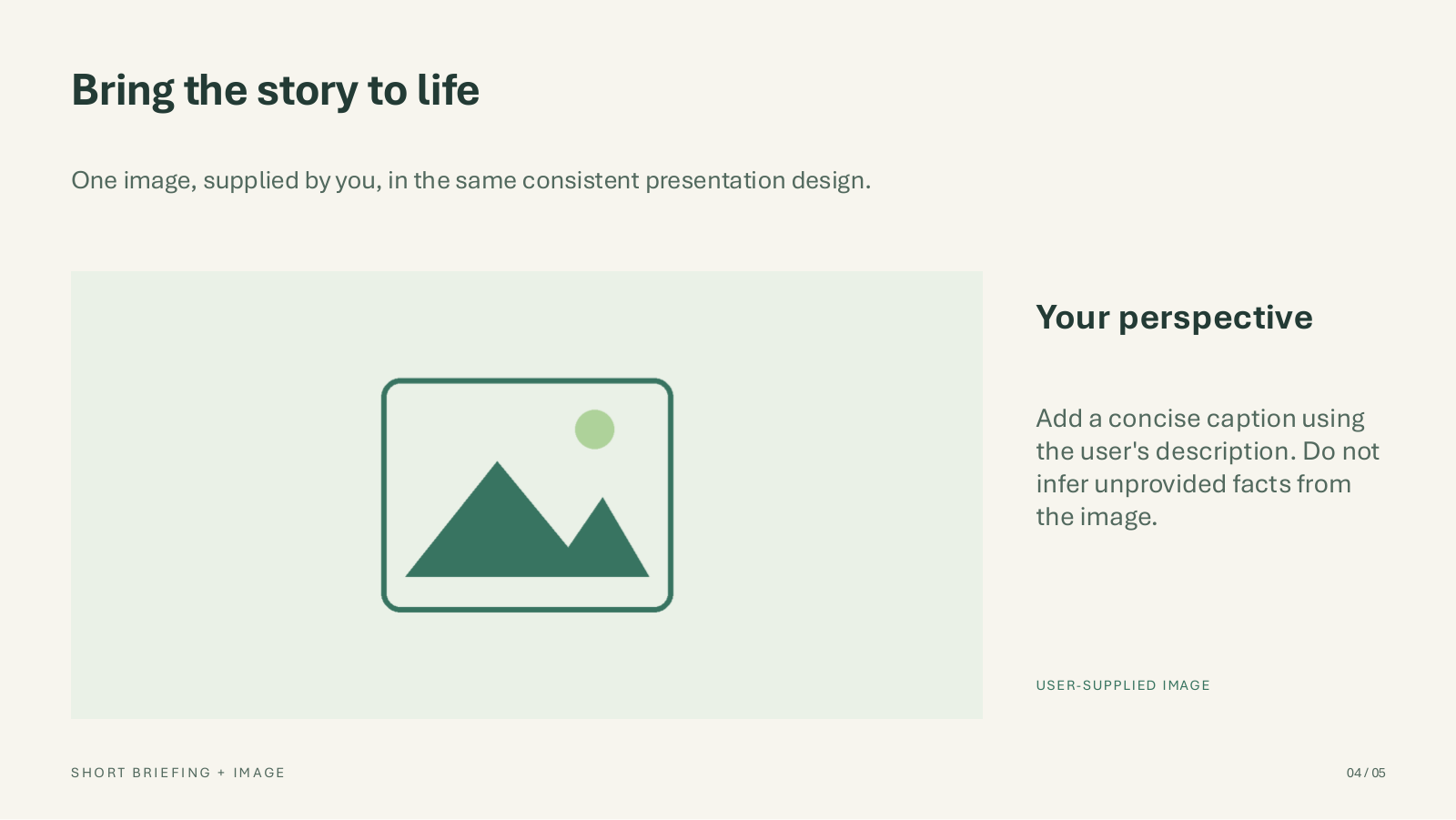
A separate five-slide design with 35 mapped text fields and an authored image placeholder. The native image rendering route is blocked, not delivered.
Download image templatePreview two actual template slides
Reference and provenance
A deliberately scoped public record.
Claims are curated from retained private run receipts, package comparisons, conversation captures and completed quality reviews. Public prose uses case names instead of tenant identifiers. Raw logs, private delivery links, raw UI screenshots and benchmark originals are intentionally not published. Only the two explicitly authorised, identity-free OneDrive file-list crops illustrate deployment setup; they are not runtime evidence. Approval for the two cats-and-dogs public-release copies is limited to their exact reviewed bytes and package metadata. Separately, the exact native solution ZIP retains explicitly approved demo resource bindings and native component metadata, not credentials or target-corporate configuration.